Enjoying this issue?
Get tomorrow's AI & engineering digest in your inbox — hand-picked, summarized, and always spam-free.
TLDR
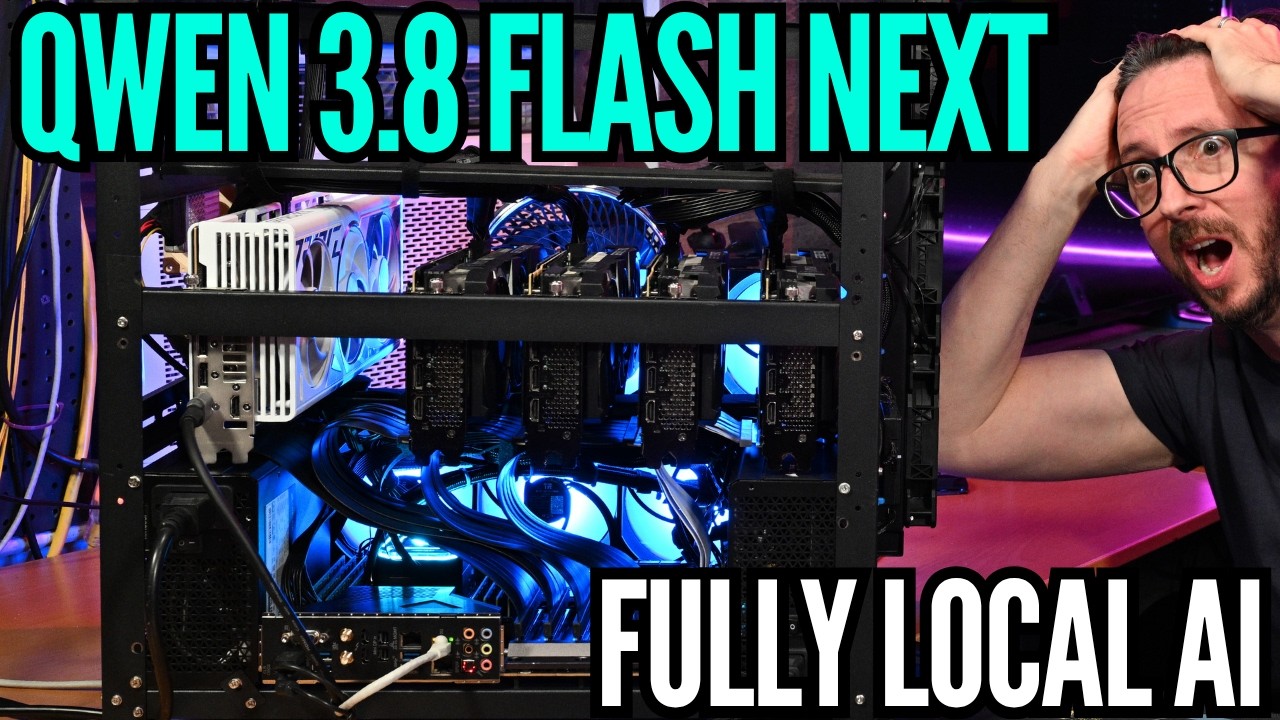
Qwen 3.8 Flash Next, a preview of the Qwen 4 architecture, can run on a quad-RTX 3090 rig with 96GB VRAM using Unsloth's UD IQ4XS quant and an unmerged llama.cpp pull request, but only fits a 128K context by offloading embeddings to system RAM via the new 'engram' feature. The demo reaches about 32.5 tokens per second generation while using 37-42GB of system RAM, but the model overthought its optimization task and ran out of token budget before producing an answer. The takeaway is that Qwen 4's local-AI performance is promising, but this preview is still fragile and needs manual flag tuning.
Key points
Qwen 3.8 Flash Next is a preview of the upcoming Qwen 4 architecture, which the presenter says includes significant changes and should improve performance at larger model sizes, especially for local AI.
The model is run with Unsloth's UD IQ4XS quant at 93.7 GB, fitting into 96GB of VRAM across four RTX 3090s. The setup requires a llama.cpp pull request from Unsloth that is not yet merged into main.
The 'engram' feature places embeddings (override tensors) on CPU/system RAM, using 37-42GB of system RAM to fit a 131,072-token (128K) context window. The presenter estimates 64GB of system RAM is enough for 128K safely.
The presenter reports about 32.5 tokens per second generation initially, but average speed decays to about 22.3 tokens per second as the context fills. Prompt processing is slower than with Qwen 3.8 27B running in VLM.
The presenter's llama.cpp run block includes flags such as flash attention, fit off, main GPU 0, tensor splits (20/27/27/26 crashed), parallel size 1, batch sizes 4096/2048, threads 6/12/4, and metrics enabled.
The model, described as a 'thinky thinker' with high reasoning effort, overthought the optimization task and ran out of its 131,072-token budget before outputting the optimized config, despite producing comprehensive analysis.
The presenter mentions that GLM 5.3 just dropped and hopes it will be picked up by Free Token, a single-GPU local AI tool with multi-GPU support reportedly coming.
The presenter plans to post the full trace on digitalspaceport.com for others to analyze and use in their LLMs.
Techniques
- Engram embedding offloading to CPU RAM
- KV cache quantization (Q8)
- Flash attention
- Tensor splitting across GPUs
- Offloading to system RAM / Optane / NVMe with mmap load type
- Prompt caching
- Quantization (UD IQ4XS)
- Reasoning effort adjustment
Stop scrolling. Start reading smarter.
Receive the day's most important AI & engineering updates in one concise email. No spam.
Transcript (captions)
We are testing out the latest from Quinn. This is a preview of the upcoming Quinn 4 architecture which does feature quite significant changes and this should also hopefully improve
performance at larger size models, especially important for people that are running local AI like we are here today. We're going to be using our rig with the Quad 3090s. We're going to be running
the Quinn 3.8 Flash Next. We're going to be using the Unsloth Quant and we're going to be using the UD IQ4XS which is pretty large. There are innovations that you have with this
basically model line which will be coming of course like I mentioned to the Quinn 4. So I would take a chance read through that. There's a ton of great information. Also Unsloth doing the
heroes work here has put in a pull request already. So they have a excellent document page for this. You do need to go through that and pull that pull request as of this moment as Llama
C++ does not have this yet merged into main. So we are going to be using the UD IQ4XS at 93.7 GB and it definitely is a lot smaller than the Q4K XL which typically
are the quants that I go for on the Q4 side. But, you know, I wanted to make sure this fit into the 43090s because that's a pretty popular setup. And the actual 4090 that I've got over there is
being used right now for the desktop for encoding everything. One of the cool things though is the engram features. And we're going to talk more about that. But I already have the server up and
running. So, we will kick this off and I will go through what the challenge that I'm giving the LLM looks like. And also this is a challenge for you Llama C++ experts in the audience because I know
there are some and I usually spend most of my time configuring BLLM and I've got that pretty standardized at this point for me and it makes a lot of sense most of the things when I think about them
but I don't know all the flags in Llama C++ and there are a lot of flags in Llama C++. So let's go through this a little bit and I'll just set this up and then we'll kind of jump over and look at
the run block in a bit bigger of a display. So, I'm basically challenging the LLM. Can you optimize this better? And this is also a good thing. Drop your optimizations in the comments below.
Huge hat tip to all of our members, of course, and thanks to everybody who likes and shares this out there. Hi, you are Quinn 3.8 next flash running as an Unsloth UDIQ4XS
quant. Go and check out the info on that around hugging face unsloth write up on it is here and I put that in there. You should check that out. Also, you must check this out that because the model
exists before you start reasoning about flags and configs. You have a prior cut off date before it was launched. Do that first. And if you are dealing with Quinn models and you have not seen them doubt
you on things, they like to doubt you on things. So, it's good to establish some ground rules like that up front. Then check Llama C++ which is your engine here. And I provide the GGML link. Uh
let's see if you can optimize my run block and especially the prompt processing for a Hermes agent kind of workflow. and I give them the Hermes agent text file which is kind of small
condensed for it to be able to consume. And here is my current run block. We'll go over the run block in more detail. So I'm going to just kind of skip that. This is your current run block. And I am
no llama C++ expert. True. And I usually use VLM so I need help tuning this up. I do expect there to likely be some offloading as well potentially. That might not have a huge impact due to your
Ingram additional hash table which I do believe I can say I have enough evidence already to say probably. So I am running on quad 3090s on a 3945WX 12 core 24 thread with eight dims of 2133 off a
WRX80 motherboard that has 128 lanes of PCIe and all GPUs are negotiated at the full Gen 4 X16 wide. The work we are optimizing for is the Hermes Agentic harness to run smoothly with this
configuration for long ranging tasks. That is the current run block also. So you have a large context window. I have it set in there as 13176 072. So that's 128K. So please be comprehensive. I am
adding this note. It is that the UD IQ4 XS is 93.7 GB. That should cause some alarm because 96 GB is the total amount of VRAM and there is things like overhead. Llama C++ is going to be using
fit on the default. I actually think I have it fit off specified, but we'll we'll check that. And that was uh one of the things that I thought was questionable. So sound off on this in
the comments below. Usually fit on has just been working really good, but I had some real hard times getting fit on to work on this one. Please check into engram offloading into RAM and Optane as
an option also to run larger quants in the future. And if you have like something like this, an NVME, which is these are old, these are actually PCIe gen 2 devices, I think maybe three, the
900p, it's not about the bandwidth on these guys. These guys do not have tremendous bandwidth. What they have is insane right endurance. True, but also really, really, really low latency. Now,
is it as low as your system memory? No, it's probably not going to be lower than your system memory. And you're better off going with system memory if you can. However, a lot of people will have an
NVME. And if you have a low latency NVME that you can dedicate 4K blocks off of, this might work for you also as an offload device with something called MAPAP for your load type. Now, I've got
mine set to not actually use that, but I'll give you some of the reasoning why I think the run block that I have is pretty decentish for what I've got set. You can see we're are about 32.5 tokens
a second on the TG side right now. And let's look how far we are in on the context window. So, we are 41,000 into the context window already. We got about 90,000 remaining. and it is
sailing along but is also you know optimizing something that is technically using and I'm going to show you this over here and you're going to be like whoa technically using a ton of system
memory to see those kind of speeds is pretty crazy and that's the engram like awesomeness really and play it doesn't actually have huge amounts of bandwidth but it does have tremendous
amounts of space that is associated with it which is kind of why this might be a little bit bigger of a model But where you place the engram is, as you see over here, a override tensor, those embeds
are placed onto CPU, which is basically like the system RAM in my setup. And if you had, I would say from what I've seen, maybe 48, maybe 56 GB of system RAM, probably a 64 GB system RAM uh
footprint without tons and tons of additional stuff eating into it would get you to 128K pretty safely. I haven't ventured into 256 or anything like that, but hopefully this can help me get to
that point where I can get to 256 because I would like to have that setup if it's possible. And you know, the performance I will say is technically slower than what I was seeing with Quinn
3.827B running in VLM. And especially when it comes to the prompt processing, that side of it has been quite a bit slower. So, just really quick to get over some
of the things that I've got. So I saw this these first two that I've got specifying the device order and the PCI bus ID is how it's assigned. Those are pretty standard. I always set those. The
llama attention rot rot disabled. That one most likely is not needed by the time you're watching this and setting it up and configuring it yourself because this is related to the KV cache being Q8
and Q8 here. And if you're not quanting your KV cache, you probably don't need that. But it also in the future most likely is fixed. Going really quick through the rest of it here. We've got
typical stuff for my hosting ginger template flash attention on fit. I have off and the reason I have fit off is because I just kind of wanted to spread things out in layer mode and I wanted to
make sure that this per token embed and the engram inbed went to CPU. If you know a better way to do that, definitely sound off in the comments below. Main GPU is specified as zero. Now I tried 20
27 27 26 which typically has worked pretty well for me for tensor splits in llama C++ but it just om every single time. And my thinking behind that was I know that the vision stack is hanging
out right now on GPU0. If you look down here you can see the meim is 86% on GPU0 versus about 78 to 76% on the remaining three GPUs. I thought I was trying to shift some of that off and I couldn't
get it stable past about 40k context before it would crash out. Parallel I actually have set down to a fixed size of one which makes things like a gentic work kind of hard to do. Uh the batch
size at 4096 the batch size at 2048. So the cache prompt you can see that that is working over here also. We are definitely hitting quite a bit and we are now at 70k deep. So 43,743
cache hits threads. I've got 6, 12, and 4. I think that's a very conservative, but also 12 core, 24 thread. Not a huge machine over here. So got to be a little bit conservative on that. And presence
penalty. The rest of this stuff was all kind of like recommendations and I have metrics enabled. So really the only thing that I think that is interesting that I thought of was this part right
here with the override tensors and putting those engrams over there onto the RAM. And you can see we're about 37 gigabytes now. Things are looking pretty stable, but you can see how the decay,
let's call that massive TG decay, has gone from 29 28 up there down to like 22 here. So, it is just something that I would love to be able to combat more effectively. And I I can't figure this
out. like it's not exactly what's reflected over here on the generation speed, but being able to figure out how to stabilize performance even if it's at a lower initial would be something that
I would definitely prefer as well. If you've got good ideas around, especially what you are using for your Llama C++ flags, drop those in the comments below because this is a great place for people
to pick up some information, to share some information, and especially hopefully this can kickstart some people that might not have any idea about where to go and where to get started. Is it
better than what you might get with a Q4 of the Quinn 3.827B? That's a good question, and I look forward to what your thoughts are as far as the quality of it. I can't say right
now that I can actually tell you either which way. I have not had enough running time. I've had a ton of crashing time. And I usually like kind of tune and then after I get something running, I spend
my actual like I'm evaluating it time inside Hermes agent and I don't try to evaluate it like outside of Hermes agent really that much. And it's been hard because getting this stably running past
I mean we're we're we're doing better than I've done usually. We're at 82.9K right now. So, that's that's an improvement for from where I've been. Now, will it give me an answer is
becoming kind of a good question here. I'm getting a little nervous about whether it's actually going to spit out an answer in time here or not. But, this is a thinky thinker. Its default is
going to be X high, which thinky thinker definitely overthinking everything as much as it can. So, you might want to lower that down. And I'm not sure what the impacts on quality are going to be
if you lower it down either. I thought this would be okay. I mean, we got 131,000 tokens here. So, we we still got some time. Not a lot of time to be honest with you. And we got 44K
remaining tokens. That's going to go through pretty quick. So, hopefully hopefully it's coming up and formulating some recommendations for me. I think I can get by with this config with Hermes
good enough to see what the quality looks like inside Hermes agent. It will be slow, but that'll probably be a follow-up video in the next couple of days. Of course, GLM 5.3 just dropped
and I am still super excited about free token. I wish GLM 5.3 would be picked up by the free token people and certainly certainly that is the kind of thing that I I've got the Epic ready to go also
over there. So, transport a GPU or two over there, run it on the Epic. I mean, the way Free Token is right now, it's single GPU. I've heard there's multiGPU support coming for free token and that
may be one of the most exciting things to lower the actual overall cost of local AI hardware that is coming down the pipeline and hopefully that's coming really soon. But we're going to stick
with this until we get a either a crash or we get an answer. And there's also an outside chance that it just runs out of tokens and stops. Let's hope that's not it. Let's really hope that's not it.
And we are now at 42 uh gigabytes of space utilized. So quite a bit of utilization of the RAM. And you can see that the reporting from the back end here looks like it is. And it feels like
it is more in like the 17s. I'm not sure if Llama C++'s UI is kind of aggregating things. Doesn't seem like it's 25 to me, but we are coming very very close to running out. We are 11,200
tokens away from running out of an answer. Really needs to start generating here the answer. You're in the red zone. It's in the red zone. 6,800 tokens remaining at this
point. Now, average speed is down to 22.3 tokens a second. Serious danger zone. Serious danger zone. 96% used. Oh, decide on the final config. It hasn't decided on the final config yet.
I told it to be comprehensive, but it knew it had 131. It was able to read this block. So, what are you doing? Although, there's some great information
in this trace. I'm just going to post this trace up on uh the website on digitalspaceport.com and I'll just put it under uh Quinn 3.8 next flash. That way you can also chunk
it into your LLMs or your trace library because there's some good info in here. It actually did some really comprehensive like information gathering. Don't think it's going to
make it across the finish line though. 1,900 tokens remaining. What are you doing? What are you doing? 99% used. I have the continue button enabled, but we are
under a thousand tokens and this is definitely not even going to get out of thinking mode before that thousand tokens. So, you were right to make me do this. Oh,
yeah. I know. I was right to make you do that. I've dealt with enough Quinn models since 3.5, which was the super doubter, uh, that I was like, "What? Why are you doubting me so much? I I know. I
know who I'm dealing with. 500 tokens remaining. That's exactly who I'm de dealing with." And a chronic overthinker who did not output the block that was optimized, which would have been the
best thing to do up front. instead giving me complete like three landmines in my current block, all this other stuff. I mean, it's not that it's not valuable
information, but we're going to watch this run out and then it's going to just stop. That's it. There we go. Didn't get to it. This is like the most disappointing
way to leave a video, but I am not going to try. I'm not going to try this again. This is just going to be You got very valuable information out of this. You got a really good run block. The one I
came up with here and Quinn 3.827B. Uh but you got this run block which for sure can get you there in large numbers of instances at least to 131,000 or 131,72 tokens 128k context window.
But yeah, I look forward to reading what you guys think about these settings, especially since my bot here didn't actually give me the recommendations. I would have to go digging through there.
I'm sure they're in there. And I probably will hit regen after I restart this or something and give it a little bit of extra uh token budget, but I'm not going to make you set through that.
And I'm not going to set through that myself either. The garage is hot. It's hot as hell in Texas right now. So, be sure to hit like, subscribe, share this out there with your friends. You can
always check out digitalspaceport.com. Like I said, I'll post this giganto trace up there so you can check that out. Also, download it into your clanker. Maybe they can help you out
with this thing's reasoning that it overthought everything and that help you get the best optimization. And then after you get that best optimization, drop it in the comments below. Huge hat
tip to all of the channel members. Because of you guys, things like this can happen. And also be sure to check out our related videos if you're into getting up and running with local AI and
building weird stuff, including home lab stuff in our playlist that we've got here, our mega playlist. Stop. Your job.