Enjoying this issue?
Get tomorrow's AI & engineering digest in your inbox — hand-picked, summarized, and always spam-free.
TLDR
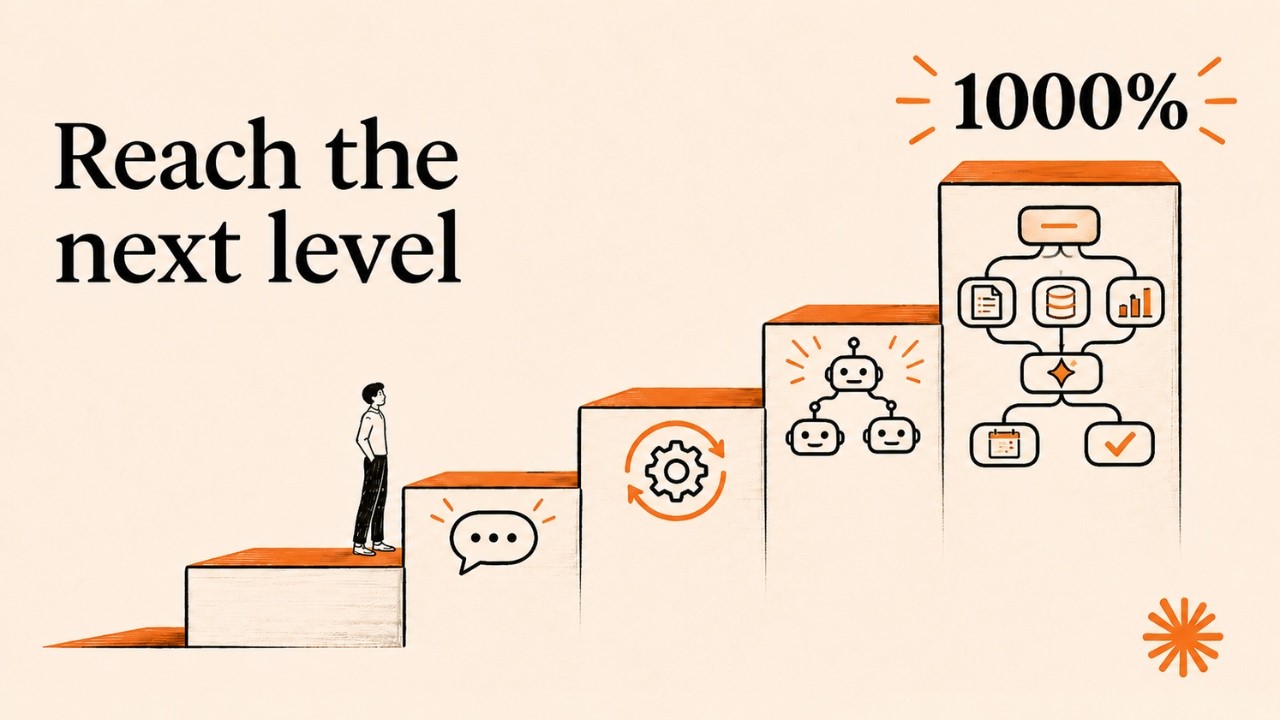
The five-floor framework for Claude usage is a useful mental model for understanding how context and agency compound. Most users never leave floor one (chat), where they manually rebuild context every session. The real leverage comes from onboarding Claude with instructions, knowledge, and memory (floor two), then automating workflows (floor three), graduating to outcome-driven agents (floor four), and finally connecting agents into a system with handoffs and a control room (floor five). The key insight is that each floor requires the previous one's discipline — you can't skip floors.
Key points
Floor one is basic chat where users manually provide context in every session.
Floor two involves onboarding Claude with instructions, knowledge, and memory for persistent context.
Floor three uses automations with triggers, steps, approval points, and exception handling.
Floor four defines agents by outcome and boundaries, letting them decide within limits.
Floor five connects multiple agents and automations with handoffs and a central control room.
Tools mentioned
Techniques
- Onboarding Claude with instructions, knowledge, and memory
- Automation with triggers, steps, approval, and exceptions
- Agent design by outcome, boundaries, and human-in-the-loop
- Multi-agent system with handoffs and control room
Stop scrolling. Start reading smarter.
Receive the day's most important AI & engineering updates in one concise email. No spam.
Transcript (captions)
Imagine someone hands you a key to a million dollar a night hotel. Every room, every floor. What do you do? Well, most people walk into the lobby, look around, and go home. That key is Claude.
[music] And this is the lobby. And this is the top floor. It's the same key, the same Claude, but one of those people is still writing the follow-up at 6:00. The other one is asleep, and the work is
done. Now, which floor are you on? and what is the one move that takes you up in 30 [music] days. This video is done in partnership with HubSpot. Look, I've worked in AI for the last nine years
with probably over a 100 clients at this point and I have learned that there are five [music] floors. Today, we take one meeting and ride the elevator up one floor at a time. Each floor gets a
bigger result from that same meeting that the last one did. Floor one is the lobby. We're taking an example meeting inspired by one of our clients which is a services company and everything you
will see on screen is a demo built on that example. Now every meeting comes with the same eight steps that I'm pretty sure most people have personally gone through. Before it you have to
prepare and then you attend and take notes and then afterward you review the action items. You draft the follow-up. You update your records, tasks, and calendar. And then you chase whatever
hasn't moved. And finally, you close it out and you [music] report back. Usually, every single meeting goes through the same eight steps. And most of them happen after the meeting is
over. [music] So, keep these eight in mind because on every floor, we will see how many of them Claude can take off of our plate. Okay. So, floor number one is the chat. You open Claude, you type, and
[music] it answers. It's where everybody starts and that's okay. The meeting ended at 4:00 and it's 6:00 and you're still in the chat window trying to get the followup right. [music] And for this
to make sense, there are two levers that you need to understand. And they follow us all the way in the building. Context is how much Claude can know about you and your work. Agency is how much it can
do on its own. On floor one, both sit at the very bottom because Claude knows nothing about you and it does nothing until you type. So the skill on this floor is giving Claude that context
yourself inside [music] the chat. And a good first message has three things in it. Who it's for, what you want back, and what good looks like. Ideally, something that you've already written
that sounds like you. Most people only type the middle one. So let me show you what happens when I leave those out. [music] So, I've got my handwritten notes here, and I'm opening a fresh
chat, and I'm going to type the few lines that I would actually have time to type between [music] meetings. So, I'm going to say, I just had a meeting about this new project. These [music] are my
notes. Help me write the follow-up. Okay, I would recognize that as a meeting follow-up. Would the person getting it recognize it? Probably not. So, let's
make it a bit friendlier. You can say spell out the abbreviation or use first names. And then you'd say, "Oh, hang on. Let me tell you who actually owns that decision." Now look at what I just
typed. Every one of those corrections was context. Who it's for, how I write, who owns that. Those are the three things arriving one fix at a time through your first prompt. Now, put them
in your first message. And floor one already gets a lot better. But this floor has a ceiling. Remember our eight jobs as part of the meeting workflow. Now, which one did we get help with the
draft? [snorts] The other seven are still on our afternoon. And tomorrow in a new chat, I'm going to start from zero again. My tone, my acronyms, who does what, and where we keep things on this
floor. You carry the context by hand every single time. Now in my work I see people staying here until the project gets big enough that starting over actually changes the answer that
somebody gets. Now sure even on floor one you can do a lot like paste in a long document building spec [music] or contract and ask what it says about one thing and then you find it. Okay you can
paste in your notes on a client that you haven't spoken to and ask for a short personal check-in or paste in a tricky customer question and ask for three ways to answer it. It's great and it's useful
as long as you bring the context with you. Now, next time you open a chat, you need to count the lines that you type before you even get to the outcome that you're looking for. If you're rebuilding
the same introduction each time, that's your floor. My view is that prompting was the first step. What separates a power user now is knowing which of those lines you should only have to write
once. That's exactly what floor two is going to address. So floor number two, I call it amplified people. [music] Okay. So we need to take the elevator up to the next level. Here we have the same
clot, but now it knows you, your work, your environment, your team. Think of it like onboarding a capable colleague. You wouldn't send them into a meeting completely unprepared and cold. You
would tell them how you like things done and give them the background and make sure they remember what happened last time. Basically, you can do the same with Claude in one sitting. I call it
onboarding Claude. And I'll show you where to get the full setup at the end of the video, but for now, here's the gist. Let's start with instructions. That's how you want it to work. You
write them once instead of typing them in every single chat. Your tone of voice, your formatting, your rules. One of mine, for example, is if my notes leave the owner of an action unclear,
you need to ask me. Don't guess. You settle that once and it holds in every single chat. Then there's knowledge, the things that you wanted to know. An email that you would happily send again is
probably more helpful than sound more professional. You can see how you greet someone, how soon you get to the point, what you put to the person's name, but knowledge can be anything from documents
that it was provided with to folders that it was connected with. And then last but not least, memory. that is what it remembers from other conversations. Now let's look at what's actually saved.
So instructions, knowledge and memory. You set them up once in one place and every chat from there on starts with them. [music] That's how you move to the next floor. And in a minute I will put
two drafts in the same email side by side and you will see the difference. It's unbelievable. Now if you want to do this along with me, the guide is linked below. You can start with one email that
already sounds like you. But now, let's see what that does to our meeting. Remember our eight steps. On this floor, Claude helps with many more of them. Before the meeting, you can ask Claude
to read the email thread and tell you what's still open. After the meeting, you can give it the same rough notes, and you'll see that the opening will be completely different. I mean, which one
could you send without spending yet more time to make it ready to go out? Clearly, the one from the second floor. Or look at the line about what happens next. [music] First, I had to explain
which team that abbreviation belongs to. Now, Claude already knew because I told it once at the start. That is a few minutes back between this meeting and [music] the next one. That's what I mean
in my framework when I say context makes AI smarter. It writes in your voice without being told twice. [music] But notice whose hand was on the keyboard each time something needed to get
started. [music] Yours, or in this case, mine. Now, let's leave this draft on screen for a second. And I want you to picture this beyond one meeting. Somebody gives Claude its plans,
standards, past projects. So, anyone on the team can ask a question and get the same answer with the document it came from. Or if it's a retail brand, they give the product details and the way
they talk to customers. So, a reply will sound the same whether the question came in by email or by chat. Or imagine a services provider, maybe an adviser or consultant. If they give Claude their
client notes, every check-in will read like [music] they wrote it themselves. Next floor, we're going to watch the action list appear before you type anything. With a customer, the draft
depends on remembering exactly what you promised. But let's stay on that draft for a second because there is still a problem with it and almost everybody has it. Claude can now write in my voice,
but what it cannot know is what I promised on the call. Unless, of course, I remember it and type it in. And right after a call is probably when I remember it the least clearly. [music] And that
is the problem that HubSpot built their new smart CRM around. Their notetaker joins the call, records it, and puts the transcript in your CRM right into the customer's record. When the meeting
wraps up, it suggests deal updates and pulls out the next steps. [music] And my favorite part is that it also drafts a personalized follow-up email waiting when the conversation ends. So what you
owe that customer is already written down in the place that your customer records live before you even start writing. So if you ever leave a meeting owing a client or your team an answer,
the CRM is worth a look. The link is in the description down below. And [music] big thanks to HubSpot for partnering with us on this video. So let's talk about floor number three. And I want you
to watch what happens when this meeting ends [music] because floor number three is automations because up to now nothing happened until somebody [music] typed. But on this floor that changes. An
automation is a list of steps that you write down once and then Claude runs them for you the same way every time. And you can write that list on a piece of paper. It just has four parts so it
shouldn't be too hard. [music] First, what kicks it off? That can be a doorbell or an alarm clock. We call it a trigger. If [snorts] it's a doorbell, that's what Claude calls a routine.
Something happens and I don't know, like a meeting ending, and that's the signal to start. An alarm clock is a scheduled task. Every weekday at 7:00, check what's still waiting. [music] You pick
the start that makes sense for the job. Second, the steps in the order that you would actually do them. When a meeting is booked, prepare. When it takes place, capture the notes when it ends. Pull out
the decisions and who agreed to what. Now, part number three, where you [music] approve. You need to decide when the human gets in the loop. You need to circle the first moment that you would
want somebody to stop and ask you a question. That's where your approval belongs. [music] In my case, it's right after the action items come out before anything else happens. And then number
four, the exceptions. [music] Let's say there's a date beside an action. I want to know whether we agreed to finish the work that day or just to discuss it that [music] day. So, I write that in. If the
notes leave it open, bring the line back to me. Now, let's watch it run on our meeting. I'm going to leave my hands right here because [music] I want you to see exactly when Claude needs me. Okay,
so the meeting is booked. The preparation is there and the notes are coming in. Now, the meeting ends and watch the decisions and action items come up there. Now this is where it
waits for me and I need to approve the actions and then it drafts the email, updates the records, the tasks in the calendar, checks whatever is due and prepares a
reminder. [music] When the work is done, it closes the task and writes the update. The email stays in draft and I get to review, approve and press [music] send. So nothing goes out without me.
Now coming back to the framework, remember context makes AI smarter and agency gives it power. You can tell you're on this floor when you open Claude and something you used to have to
ask for is already there for you to check. And it doesn't have to start with a meeting. An alarm clock can be every morning at 6, Claude checks a list of websites that you follow and sends you a
short report of what changed. A doorbell could be when a new order comes in, check it against your checklist before it goes any further and flag anything missing. or when a client sends over
documents, it pulls the figures into one sheet and marks anything that looks off for you to check. Now, I want you to keep that list at hand because on the next floor, we will find out what a list
can't see. Now, if you'd like to work through your first list with us, we would love to welcome you in our community. The link is here as well as in the description below. So, we've got
two floors left before you pick yours. So keep your last meeting in mind. Okay. Floor four is agents. [music] This is where most people get confused. So let's make it simple. With an
automation, you define the steps. First this and then that and with this. With an agent, you define the outcome and the boundaries and then it works by itself. Why would you need that? Well, look at
our list from floor three. One step says chase what's overdue. That works when we already know what to chase. But suppose Thursday comes and the work is still open because somebody's waiting for a
decision from me. A list can't see that. Okay. And a reminder to the person doing the work would just be a pretty annoying email to get. So when you set up an agent, you answer three questions. What
outcome do I want? What can it decide? And what can it use? And when does a human step in? [music] And the more it does alone, the more a wrong answer costs. So if it tells a client one thing
and I tell them another, a reminder doesn't fix that. So you need to write down where it stops before it ever runs. For our meeting, for example, the outcome is that every commitment has an
owner and a next date or there's a question waiting for the person who can settle it. If the notes and the follow-up agree, it can decide whether this meeting needs a task, a record
updated, or a draft about the next date because what I want on my desk is the exception. [music] Okay, it's Thursday. It's addressed to me and it asks one question. I answered
it right here and nobody else has to chase anything. But agents are not only for meetings, right? An agent that answers customer questions across email, chat, and social within the rules that
you set and hands the tricky ones to a person could be very useful to a business. Or an agent that checks every print job before it goes to press and only asks the account manager when
something needs a decision. or um one that looks at your client list, works out who hasn't heard from you in a while, and then drafts a personal note for you to approve. All of these are
examples that we have implemented for ourselves or for our clients. Now, you may have no reason to build one today. You can still ask the question that tells you you're here. Did I hand over
an outcome and tell it when to come back to me? If you said yes, then congratulations. But what happens if the thing that changes comes in after we've gone [music] to bed? Let's talk about
floor number five. This one is what I call an AI powered business. On floor four, one agent owned one outcome. Pretty simple, right? Straightforward. Up here, agents and automations work
together as a system. One finishes its piece and then hands the next piece to another. [music] Building this well comes down to three things. First, the handoffs. What one piece of work passes
to the next. Second, one place where you can see all of it. I call that the control room or a command center, whatever you want to call it. And third, the point where it all comes back to you
before anything goes out. [music] Now, let me show you on our meeting. It's 11:47 at night in this example. Somebody texts to move tomorrow's meeting. So, there's the request and before I go to
it in the morning, the new slot is being held. [music] And over here is the reply that goes with it. That is the handoff. A hold means I still have a choice. I can look at the time, check who asked
for the change and read the message that's about to go out. That's where it comes back to me and then I press send. And that's the control room. Every piece of work in one place waiting only for
the decisions that I should be making. [music] Our meeting is the small version of this. A bigger one inspired by one of our clients who is a reporting and compliance services company would be
something like this. The client documents come in, one part pulls out the data, another flags anything unusual, another does the calculations, and another drafts the report. [music]
The team's job becomes reviewing and signing off instead of doing every single step by hand. Now, when I said the same claude, I meant the model. The features available obviously depend on
your plan and the tools that you've given it permission to use. The sign you're up here is that one piece of work hands the next one over before you even know the meeting has changed. So, next I
would like for you to pick the floor that looks like your last meeting. Are you explaining yourself again? Does the draft already sound like you? Did the work start before you asked? Did you
give Claude an outcome and get back just the exceptions or did one agent hand the work to the next one while you were away? Give yourself one move for the next 30 days. If you're on floor one,
write a page on who you are, how you write, and put it in your instructions so Claude reads it every time. If you're on floor two, pick one job that you repeat every meeting or every time you
go through a task that you repeat a lot, write the steps and schedule it as a draft. If you're on floor three, give that job an outcome and write down what it may decide alone. If you're on floor
four, connect two agents and keep your review between the handoff and anything that goes out. If you're already on five, pick one handoff and check that the right decision still comes back to
you. Now, one rule before you go. Do not skip floors. Each floor will teach you how to check the one above it. So, the checking never goes away. It just moves. Think of the next meeting that you
already have booked. That's where you can start. Which floor are you on? I want you to tell me in the comments below. And if your team wants to map this with us, we do have a service that
helps you do exactly that. The link is in the description below. And you can also book a call with us here. And I promise to show you where to get the full setup. If you're on floor one or
two, start with this video where I onboard Claude step by step. And if you feel like you are already past this, you're always more than welcome to join us in our founders community where we
have a full Claude Academy course that takes you through absolutely [music] everything you need to know to make the best out of Claude and get you as close to floor 5 as possible. Thank you so so
much for watching. Like this video if you did. Be sure to subscribe if you haven't done so. Share this with anyone in your circle of friends or family or co-workers who you think needs to be
better at using Claude or could easily get to the next floor. And until next time, thank you again and I'll see you soon. Bye.