Transcript (captions)
Claude and AI coding tutorials are dime a dozen these days, but what people are not really covering nearly enough is how to use these tools to work in large code bases. That's what I want to cover with you right now because you probably already have a complex code base or two or three. You've got the apps and platforms that you're building, your second brain. You have these code bases that are tens or even hundreds of thousands of lines long and it can be tough to get these coding agents to navigate those larger code bases and work in them effectively. And even if you don't have a complex code base yet, you'll get there, my friend.
You start with a simple idea, a simple code base, but as you evolve that code base, the coding agent strategies that worked before, they fall flat on their face. That's why I'm excited to get into this. Anthropic put out this article just a few days ago, how to use Claude code to work in large code bases. And really, these ideas apply no matter the coding agent that you are using. And there's a lot of gold in this blog post.
So, I want to get into all of this. They do stay pretty high-level in the blog post though. And so, I also took all of their strategies and I built them into a demo code base for this video. So, not only are we covering the article, but we're also going to see concrete examples of all the strategies in action. I even have a Claude plugin that makes it super easy for you in two commands to take a lot of the strategies that we're covering here and immediately bring them into any code base that you are working on.
And so, we'll get to that, but I want to start pretty high-level, share these strategies, and then let's see them in action as well. So, Anthropic starts by talking about all of the pretty impressive places where Claude code is currently being used at an enterprise level across multi-million line mono repos, decades-old legacy systems, distributed architecture spanning dozens of repositories. Basically, they're just making the point here that if you think your code base is too complex for Claude code, you are wrong. And then they go into how Claude Code navigates a code base, at least before we have more of an AI layer. So, the tool out of the box, it uses something called a genetic search.
So, we're not performing traditional rag or semantic search. There's no code base indexing with Claude Code. Instead, it's going to navigate a code base more as an engineer would, with command line tools like grep, just looking at the folder structure, using all of the command line tools at its disposal to identify the places for, especially larger code base, to pay attention to and where it needs to edit. And so, this is really powerful because then there's no index that you have to keep in sync, but the trade-off is that Claude works best when it has enough starting context to know where to look. And so, this really gets us into a lot of the strategies that we'll cover here.
It's all about how do we curate that context up front so Claude can navigate a more complex code base effectively, knowing where to actually look based on the requests that we have for it. So, that then brings us to the main point of this blog post that really sets the stage for all the strategies. The harness matters as much as the model. A lot of people get really hyper-fixated on model benchmarks, and they think that tools like Claude Code and Codex, the power really comes from how good the underlying large language model is. And yes, that matters, but honestly, what matters even more is the ecosystem built around the model, the harness.
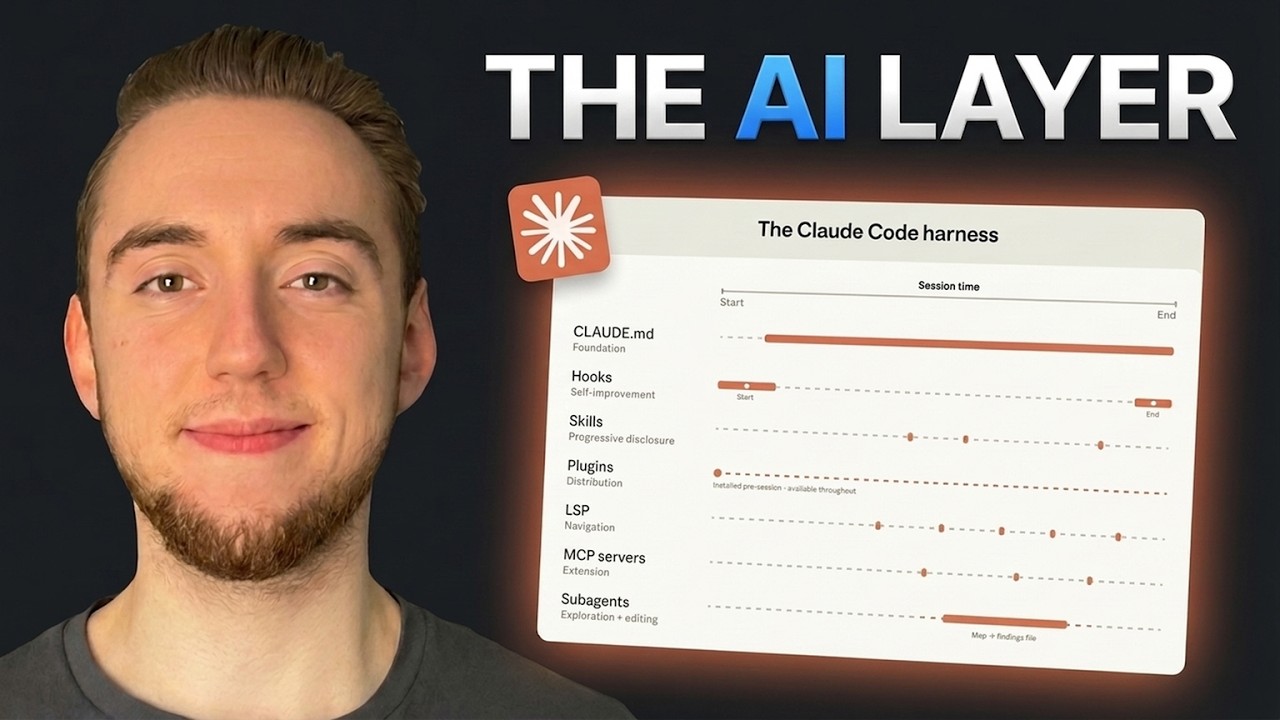
And I like to call it the AI layer. I think it's more descriptive. It's really everything that they lay out right here with quite a few paragraphs. I also have a nice diagram to make this even simpler. The AI layer is the set of context and tools that you give your coding agent to work on a code base.
And so, traditionally, a code base would have two main parts. It would have the code, and then it would have the tests. And so, now with the AI layer, we have a third component of every code base introduced. This is everything like your global rules, your skills, your MCP servers and sub agents. Really every single individual feature of Claude code that gives tools or context, that is a part of your AI layer.
And so there's seven things that we have here. Couple you might not be as familiar with like LSP and hooks, but we'll talk about all of that cuz really each of these seven map to one of the strategies that Claude code covers. This is where I have a concrete example for each of them. So let's get into this. So the initial strategies that Anthropic covers are all about making it as easy as possible for Claude code to navigate your code base at scale.
And a lot of it centers around the first and maybe even most important part of your entire AI layer, which is your global rules. So take a look at this. They have this visual representation for how often that each part of the AI layer is used throughout a Claude code session. You can see that most of them are sporadic like your hooks and skills and the LSP for navigation. We'll talk about all these as well, but your global rules as your foundation, it is dictating the behavior of Claude code the entire time.
So you better spend a good amount of time strategizing around your context curation here. And so their first tip is to keep your global rules lean and layered. Something that I see a lot of people do unfortunately is create these global rule files that are thousands of lines long. That is not a good idea. There are actually studies out there that prove that that can hurt your coding agent performance even if you think that being really specific and comprehensive helps, you're just going to overwhelm your LLM with context.
You just need core information. What is the code base about? Give it a little bit of an idea of the tech stack or architecture for example. I mean this is just an example that I have in this repo. Um then your general conventions and gotchas like what I have right here, commands to run for things like testing and getting the dev server spun up.
Like that's all you really need. So keeping it lean. And what Anthropic means by layered is you can actually have claw.md files in subdirectories. And so, I have the main claw.md at the root of my repository here. That means that whenever I start a claw session like this, it is always going to have these rules loaded.
But then, as soon as I navigate in and start editing files in one of these subdirectories, it's also going to load in that claw.md automatically. So, if I start working in the API service, for example, I'm going to load in my core rules, or I should say those are already loaded, but then I'm also going to load in the API service rules that I have in the separate claw.md. So, I'm building up the list of conventions based on where I'm actually operating in the code base. It's like the idea of progressive disclosure that we have with claw code skills. This is really powerful because if you have a massive code base, you're going to have a ton of conventions, but most of them are going to be specific to certain slices of the code base.
So, let's just load in the conventions we need depending on where we're working. Because whenever you have some kind of GitHub issue or Jira ticket or whatever, hopefully it's scoped to a very specific part of your code base. And then, another thing you can do if you're really confident where you need to work in a code base is you can actually initialize claw code in that subdirectory. So, if I know, for example, that based on a Jira ticket or GitHub issue, I'm only going to be working in the API service, then I can, you know, right-click in the VS Code, copy my path, and then within here, just for the sake of example, I guess I'm already there, but I can change my directory to that path, and then I can open up claw here. And the power of this is now this is the current working directory for claw code.
So, unless I tell it to, it's really going to stick to editing files in just this directory. So, it'll load the claw.md here, and then it still will load the root claw.md. So, you can see that it does automatically walk up the directory tree and load every claw.md. So the root context isn't lost, but we're just a honing claw and code in on that part of the code base. And so basically you're doing the navigation here.
So the rest of their strategies are like, you know, how can you help claw navigate things effectively? But [snorts] most of the time, especially if you are an engineer, you know where to start. Now if you don't know where to start, that's where this strategy comes in. Building up some kind of code base map when the directory structure doesn't do the work. And this usually I put in my global rule.
So I don't have it in this example here, but often what I'll do is I'll have a section that outlines the directory structure, like all the subdirectories, maybe like a brief description of each of them. That way claw can help me do the discovery, help me figure out what slice of the larger code base to focus on based on the work that I have. So usually it comes down to claw's [snorts] going to help you figure that out or you're just going to immediately know and initialize claw code there. The sponsor of today's video is JetBrains Academy. Now I've tried a lot of AI courses in the past and most of them have this problem.
The way that I'd put it is that the course ends where the real work actually begins. And what I mean by that is you'll go through some material and some really basic exercises, but then you don't get to really deploy anything. And JetBrains Academy is different with their skill paths. Here when you learn a concept, you get to apply it to a real project immediately. And so you do your work and go through the lessons in the IDE and then you get to right away deploy what you've built in AWS sandboxes.
So you start by picking a path. Let's say we want to do build and deploy custom LLMs with Python and AWS. It seems very relevant right now. And so we have the course layout here. This is the syllabus and you can see that each of the sections it'll open the course in your PyCharm IDE.
So we get to go through the material where we're doing all of our coding already. The AI assistance is built right into the IDE. I can navigate through the lessons and go through all the material right here really easily. And then as I'm doing my exercises, it's just right here in the IDE. So I get to code as I normally do.
And then when it comes time to run and deploy things like the fine-tune model that we have in this lesson, we get to do it in an AWS sandbox. This is not a mock. It is running in the cloud, but it's fully prepaid. You don't need an AWS account. This is what I wish I had when I was learning how to build and fine-tune models.
So when you finish a skill path, you have real projects deployed alive that you can host on GitHub, talk about on interviews, and get hired for. And you have certificates both from JetBrains and AWS to back it up. So if you're looking to build proficiency and credibility with generative AI and LLM engineering, I would highly recommend checking out JetBrains Academy's skill paths. I'll have a link to them in the description. Cool.
So there are some more strategies to cover here like scoping your tests and lint commands per subdirectory, ignoring certain files like build artifacts, your coding agent never reads them. But I want to move on now to talk about the next part of the AI layer, and that is hooks. And you'll see in a second why I want to cover this right after global rules. So you can use hooks to make your entire AI layer, your entire setup self-improving. This is really really cool.
This is part of the goal that I was talking about. So most teams think of hooks as scripts that prevent Claude from doing something wrong. So a lot of people use hooks like a tool use hook to stop Claude from editing in certain directories, removing files or folders, that kind of thing. But their more valuable use is continuous improvement. And so take a look at this.
A stop hook can reflect on what happened during a session and propose claude.md updates while the context is fresh, right? So that the hook runs at the end of the session. And I have a live demo of this. I'll show you. I actually built out both of these hooks here.
And then a start hook can load team-specific context dynamically. So every dev gets the right setup without manual configuration. So based on the role or the part of the code base that they're editing, we can have a hook that will even go out to Confluence, for example, and pull documentation for that team, that function, that part of the code base, whatever. So I have actually a a pretty basic example of that here. And so I have a hook.
And so you can see in my settings.json, this is where I have the start and end hooks defined. So propose claw.md updates for the stop hook, and then the session start context for the start hook. And so what this hook does, this is just more of a basic example, is it's going to load context around Git. And so any kind of unstaged changes that I have, like a change to this file here, looking at the Git history as well. So take a look at this.
If I go into claw, and I start a new session, and then I say, "What did the start a session hook tell you about this session?" Obviously, it's a little cheesy, but just to show you that it loaded the context. We have this orientation here. The working tree is clean. Here are our recent commits. Right?
And so like this is just giving it some context going into like here is what we're currently working on, and here is what we worked on recently. And you could extend this, like I said, to pull things from Confluence based on the developer that is starting claw code. There's a lot that you can do here. And then take a look at this. To demo the stop hook for you, I'm going to give a really simple request for something that I want to change.
Obviously, if I was doing work for real, I'd go through a more extensive process of planning and implementing and validating. But here I'm just asking it to make a simple change so that I have something to then propose a change to the global rules. Cuz something really important that you need to do, and you can see that the process actually ran here in order to propose some changes. It's something that's really important to do is as you're evolving your code base, you need to make sure that your rules are evolving as well. It's really, really bad when your claw.md goes stale because you made some changes in the code base where it kind of, you know, dictates something needs to be added to the global rules or something has to be updated.
And so, that's why it's really powerful to have this kind of process that automatically proposes these changes. So, take a look at this. This hook runs whenever Claude stops. So, whenever it's done with its turn. So, you saw that terminal pop up for a little bit.
It runs a separate Claude session in headless mode to look at these changes, look at the global rules, and propose if anything needs to be tweaked. And so, it outputs that in a markdown document. Take a look at this. I have my Claude markdown review. And so, we have the reflection that just ran right now.
Here are the two areas that were touched. So, it's going to look at those subdirectory global rules as well. And here it decided no changes needed. Adding a trial enum value follows the existing model only convention. So, the thing that we really care about at a high level still holds up based on these changes.
And so, maybe it's not the best example cuz it didn't decide to change anything. But, I think that's also really powerful because usually we don't need to change our Claude code or claw.md conventions. That's especially why we keep these files so lean. But, maybe for example, I could say, you know, make a change that would require updating the claw.md. So, I'll come back and see what it does with this.
And so, there we go. We had it change something bigger in the billing service. And now in our markdown review, it is recommending making update to the second bullet in the claw.md for our billing service subdirectory. Pretty neat. So, now we can take these recommendations and we can action on it ourselves.
We can have a conversation with a separate Claude session to make these changes. It's up to you how you want to take this forward. The power I'm just trying to show you here is we can have this self-reflection process constantly running in the background making these suggestions that we can, you know, just action on when we're actually ready to. So, the next part of the AI layer that Anthropic focuses on here is skills. And you probably know what a skill is.
They've been blowing up all over the internet the past few months. It's really like the main way to extend Claude code right now with new workflows and capabilities. And so, like this is an example of a skill right here for adding API routes in this code base. Really, a skill is some kind of set of steps, some kind of process, reusable prompt that you have for Claude code. And these are really important in large code bases because you're going to have dozens or maybe even hundreds of task types.
Like this would apply to a task type of building an API endpoint. And so, not all expertise needs to be present in every session, which is the same reason why we have different claw.md files in subdirectories, which there is definitely some overlap here that I'll talk about in a second. And so, skills solve this through progressive disclosure. So, we're offloading specialized workflows and domain knowledge, and we load it when we actually need it. So, that way we're not bringing in prompting and workflows for things that don't apply to the current task at hand.
And so, when we define a skill, we have the name and the description. The description is what is given to the coding agent right away. And if it decides, like okay, based on the description, I should use this skill, then it'll read the full skill.md file. I've talked about skills a lot on my channel already. But, the parameter that most people don't know about, and this is what Anthropic talks about right here, we can make it so that skills can be scoped to specific paths, so they only activate in relevant parts of the code base.
Like we know that this process for adding API routes that we want to be very repeatable, it only applies when we're going to be reading and editing files in the API services directory. And so, we can scope it there. Really, really powerful. It's a way to basically enforce it like when we touch this part of the code base, we're going to bring this convention, this workflow into the session context. And so like I said, there is a little bit of overlap here with that and the subdirectory claw.md files, right?
Like we're loading this in only when we work here. Same thing when we operate in here, we're also going to read this claw.md. The distinction that I like to make is that global rules are your conventions. It's the rules that you need to follow. Like every route is registered here for example.
Your skills are the workflows. So we have rules and we have workflows. So that distinguishment kind of helps me understand the overlap, but it really for a lot of these sorts of conventions, you can kind of do it as a skill or a claw.md. The more important thing here is we just want to scope these conventions and rules to the part of the code base where they actually matter. So we're not overwhelming our coding agent with context it doesn't care about.
So Anthropic talks about plugins next, but I'm going to cover that at the end cuz I'll show you how to use my plugin to incorporate all these ideas in your own code base. So let's move on to talk about language server protocols. I'm excited for this cuz I just started incorporating this into my own Claude Code ecosystem. It's really powerful. Essentially, you give Claude the same navigation that a developer has in their IDE.
And a lot of bigger companies especially build own custom LSPs to really help Claude navigate through the code base effectively. And so an LSP is something that is really built into any IDE by default. It's the kind of thing that allows you to know like in VS Code I can control click here to immediately navigate to the definition for the class that I used in this other file. So that kind of like type hinting and navigation and highlighting like all that is an LSP. And so [snorts] essentially with an MCP server, we can give Claude Code this exact functionality that we as the engineers have in our IDE to make it so that we have better search capabilities than just grep by itself or it can complement some of the tools like grep that are built into Claude code natively just through the CLI commands that it has.
And so what I built here, I'm actually kind of knocking two birds with one stone because they talk about LSP and then talk about MCP servers as a way to extend everything is I built a local MCP server that comes with this code base. It comes with the plug-in that I'll cover in a little bit as well that gives Claude code some new code base search capabilities. And so take a look at this. I'm going to go into a new Claude session here. If I do /mcp, you can see that I have the code base search enabled.
There are three tools here to complement the search capabilities that I already have. And so I'm going to paste in a prompt, find every place that monthly total sense is referenced in this repo. And I know it's like oddly specific, but that's the point is we need something very specific to search for here. And I'm telling it not to use grep just for the sake of the demo. I'm telling it to use a symbol level approach and that's going to key in that it needs to leverage the MCP server that I built here that leverages the language server protocol.
So it's able to do more intelligent searches that it might figure out it needs to if I don't tell it to not use grep or you could just, you know, build in some instructions in your global rules for how you want to use these searches. But you can see here that it used my where is and find references tools in my custom MCP server. And so here are the results. We have one definition and two references. Pretty cool.
So I know that like I'm talking about complex code bases here, but my demo is kind of simple in the end, but I kind of have to have that balance there of like a somewhat complicated code base but still it has to be easy to like parse through and show the results here. But that's an example of using an MCP server to expose a language server protocol. And really for massive code bases, once you get like into the six digits for lines of code, you need something like this because grep by itself is going to be slow and really token inefficient as you're trying to navigate through a code base. This is a lot more of a directed search looking for things like the definitions and references for things like classes and variables. So, that's a quick overview of LSP and MCP and how I use them together.
You got to have some kind of harness to give better search capability to Claude code when you're working in a larger code bases. And really they operate like skills. Just use sporadically throughout your session. So, like with skills we're loading in instructions when we need those conventions or workflows, whatever. LSP, whenever we need to perform those searches to find definitions, references, things like that, we'll call upon the tools.
MCP, pretty similar, right? Like we need to perform a search, take some kind of external action, we call upon one or multiple tools for an MCP server at that time. Now, the last part of the AI layer that we still have to cover is subagents, but this one's nice and simple. The advice that Anthropic has here is simple but still really powerful. We want to use subagents to split exploration from editing.
So, the idea with a subagent is that we send in a task. Like we want it to search the web for, you know, best practices for this kind of architecture or maybe to do some kind of code base exploration to find the part of the code base to focus on. We send in a task and it runs with its own context window. It does all the analysis it needs to and then it returns a summary back to our primary Claude code session to reason about and action on. And these kind of exploration tasks that we want to give to a subagent, you can imagine them getting to hundreds of thousands of tokens.
So, if we're not using a subagent and we have our primary Claude code session do that web research or code base exploration, by the time we get to the actual editing, we're already going to have this extremely bloated context window. That's why we want to dispatch the work to the subagents, especially because with exploration, usually all we need is that summary back, right? Like, here are the recommendations for the tech stack. Here's the part of the code base we're going to have to address based on this Jira ticket. Like, that's the kind of thing that you task a sub agent with.
And so, I don't actually have that much of a demo here for sub agents cuz I use them liberally like all the time. Like, especially at the start of the conversation, I'll say something like, "I want you to spin up three sub agents here. One to research the database, one the back end, one the front end. Help me figure out how I can add in authentication." I don't know, I'm just kind of throwing out something off the cuff here, but you have sub agents built into a lot of these coding agents now, like Claude Code and CodeX. And so, you don't even have to define your own custom sub agents like a lot of people did before.
You just send off a request like this, and now it's just going to use the explorer sub agent that we have built into Claude Code. And so, it takes care of that whole like dispatch, getting the summary back, and everything. All right. So, the rest of the article that we haven't covered yet is really covering a lot of the strategies that I already hit on, like running LSP server so Claude can search by symbol, not by string, talking about actively maintaining the claw.md file. So, this is where the stop hook comes in to make those recommendations as we're operating with Claude Code.
The other thing that I want to hit on here is the plugin that I have for you. So, if you go to the read me for this demo repo that I'll link to in the description, I have instructions for taking this to your own code base. Now, obviously some of the things like the claw.mds in the subdirectories are specific to me, but this plugin is going to give you the self-improving stop hook, the explorer sub agent, so it's more like a custom sub agent that I built that you can use, and it's going to give you the code base search MCP server with that LSP. So, you have that whole searching harness, and then I'm going to give you a more generic skill that you can use in as an example that shows what it looks like to use that path parameter to scope a skill to a certain subdirectory. So, just kind of consider this plugin a starting point.
If you want to like really quickly pull in these things to experiment on your own code base, you can install this plug-in on any code base, even one that you already have built out with its own AI layer already. So, all you have to do is / in Claude code / plug-in marketplace add, and then give the path to the repository. So, you still have to clone this repo locally cuz I don't have this hosted in NPM. So, you give the path and then make sure you add the tooling folder at the end. And then you just do plug-in install helpline AI layer at helpline tooling.
Then you go through the whole installation process here, and then boom, it'll install all these things for you to start playing around with. So, that's one way to do it. I just wanted to add a plug-in to make it really convenient. The other way to get started with a lot of the ideas that I have here, aside from, you know, reading the Anthropic blog post, is just do clone this repository, point your Claude code at it, you know, like copy this directory, you know, like right click, copy path, give this to Claude code, and say, "Hey, these are a bunch of cool strategies Claude shared with me for working with complex code bases. Help me understand how they work and how I can incorporate it for my code base." That's always the easiest way to really take any repo these days is just give it to Claude code and have it help you understand it and apply it.
So, that'd be my recommendation for getting started here. So, I hope that you found these strategies really useful, that you can apply them right away to your larger code bases. Even if you had some of these things incorporated already, I hope there are some good golden nuggets for you. And so, the last thing that I want to end on is talking about some really good advice that Anthropic also gives at the bottom of their article here. It's all about assigning ownership for Claude code management and adoption.
And I've been around a lot of companies as I've done my consultings and trainings, I know this is really good advice. Essentially, what they're saying here is to have a an individual or more likely a smaller team to champion the initial build-out of the AI layer for your organization. And so, what that looks like is you start with a quiet investment period. You have a couple of people that build out the the rules and skills and the LSP and the MCP servers, the whole AI layer for the organization, and then roll it out to people over time. And the power of this is you get to create something that's really foundational for everyone to adopt together, and then people can get more consistent results with Claude Coder or whatever coding agent faster, so they're not disappointed when they first use the tool.
You want to avoid people being really disappointed when they first use it cuz they don't have an AI layer, and you want to avoid everyone evolving their own separate AI layers when really you want a standard for the organization. So, really really good advice that they have here. This is also something that I help with. And so, I do offer enterprise trainings where I help you build out the AI layer, understand the core methodologies for AI coding, and create that standard for your adoption of coding agent tools like Claude Coder. So, definitely I got my email in my bio.
Reach out to me if you're interested in that. Otherwise, I hope that these strategies were useful for you. Appreciate you going through everything here. Let me know if you have any questions in the comments below. Otherwise, if you appreciate this video and you're looking forward to more things on AI coding and Claude Coder, I would really appreciate a like and a subscribe.
And with that, I will see you in the next video.