Enjoying this issue?
Get tomorrow's AI & engineering digest in your inbox — hand-picked, summarized, and always spam-free.
TLDR
CUDA is a platform that manages GPU memory hierarchy and parallel execution, using PTX as an intermediate representation to ensure code runs across different NVIDIA GPU generations. The key challenge is balancing which optimizations become core library features and which are left to the ecosystem, a tension that has shaped how AI workloads are executed.
Key points
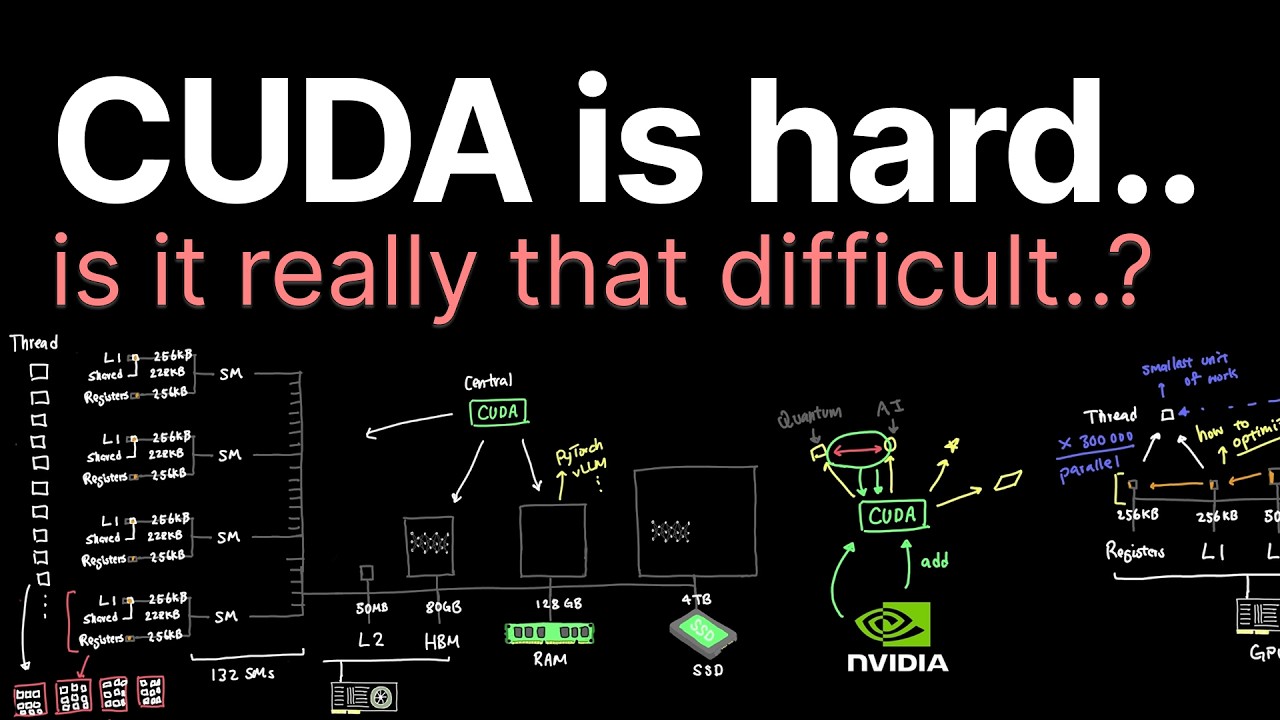
GPU memory hierarchy shrinks from HBM (80 GB) to L2 cache (50 MB) to register files and shared memory (256 KB each), with thousands of threads sharing the smallest memory.
A 100 million operation matrix multiplication can theoretically be done in less than 2 microseconds by splitting across 132 SMs, each with 4 warps of 32 threads.
CUDA uses PTX (parallel thread execution) as an intermediate representation to compile kernels into architecture-specific machine code for different GPU generations.
CUDA has evolved to support AI and other industries, with libraries like cuBLAS and cuDNN, and higher-level abstractions like Triton and Flash Attention built on top.
The balance between core library features and ecosystem customization is a key challenge for CUDA's development.
Techniques
- memory hierarchy management
- parallel thread execution
- PTX intermediate representation
- kernel compilation
- matrix multiplication parallelization
- shared memory optimization
Stop scrolling. Start reading smarter.
Receive the day's most important AI & engineering updates in one concise email. No spam.
Transcript (captions)
Understanding CUDA is just one of those things that we really don't know where to start. Thankfully, it's at least easy to understand the memory hierarchy in our computer between storage, CPU, and
graphics cards because we've all used these before. For example, we often download an open model from the internet that gets stored in our solidstate drive. And to actually run this model at
home, an inference engine that orchestrates on the CPU needs to pull these weights from the SSD all the way to the GPU so that the model can run there instead. But turns out the same
kind of hierarchy of memory that we see right here actually exist in the GPU as well. The hierarchy of memory looks something like this. And CUDA has a lot to do with how all of this works. What
you might have noticed here is that as you move down the hierarchy from SSD where we initially held our models weights to HPM and eventually working our way down to the very thread that
runs them, you'll notice here that the size of the memory that's available actually gets smaller and smaller. And that might seem a little bit counterintuitive at first because
wouldn't it just make more sense for the thread where work actually gets done to have the largest amount of memory available? Thankfully, I had some help from Steven Jones, who has been working
on CUDA since CUDA 1.0 was released back in 2008. >> When when the hardware architects designed the chip, they balance it. The amount of storage a thread has is
related to how many operations it can do per second or per cycle because there's no point giving the thread a million times more storage than it needs cuz it can't use it. You'd rather spend those
transistors making a different storage bigger. So given this disparity of memory that we see right here, what typically happens is that the models weights that's stored in HPM would then
stream towards the cache which later gets used up by the thread on demand as needed to actually do the computation on them. For example, if the type of job that we're doing here is just a simple
forward pass inside a large language model, one of the jobs here might be a matrix multiplication. A single matrix multiplication might be around a 100 million operations. And guess what? Our
GPU here can theoretically do this entire thing in less than two microsconds. But how? We have to start by converting this huge scope of work that we have in front of us into
literally the smallest unit of execution so that thousands of threads can work on them in parallel. But because matrix multiplication needs to first pull relevant data from HPM down to the lower
hierarchy of memory, we have to somehow divide up the 100 million matrix multiplication into smallest unit of work that a thread can do, but also optimize on how to best use the shared
memory among thousands and thousands of threads that also compete for the same spot. More specifically, as the model's weights get pulled from HBM to L2 storage, that's 50 megabytes into
individual SM out of 132 different SM and each SM having 256 kilobyt of L1 cache and shared memory as well as another 256 kilobyt for registered files. I know things are getting real
dicey here, but what you have to keep in mind here is that the reason why we have hundreds of SMS here in the first place is because we're trying to split up the huge chunk of work into a much more
digestible size. And SM is just one of the ways in the hardware side to house thousands of threads to execute in parallel. And the whole point of doing it this way in the first place is so
that we can reduce a job like a 100 million operations into literally smallest unit of work that can be done by a single thread but in parallel. And this is where you start to notice why
CUDA becomes important because this is where hardware starts to meet with software. On the hardware side, we just talked about how memory shrinks down as we go from HBM at 80 GB, L2 cache at 50
megabytes, register files at 256 kilobyt, and shared memory at 228 kilob. But on the software side, everything is a thread. And typically a single SM can have more than 2,000 threads alive at
the same time. Which means when software actually meets hardware, the smallest unit of memory here needs to be shared by thousands of other threads. And that's a big engineering challenge
because we have to optimize this space based on what we actually want to do with it. Which means this leaves room for hundreds if not thousands of CUDA kernels to be developed. And each kernel
has their own unique opinion on how compute should be divided across threads and how memory should be allocated. So to put everything together, our 100 million floatingpoint operations that we
talked about gets split into 132 SMS with four warps. And each warp running 32 threads at once means theoretically the entire 100 million operations needs almost 3,000 clock cycles to get the job
done. And for a GPU that runs at 1.5 GHz clock speed, this takes just shy of two microsconds to get the job done in theory. Pretty incredible, right? Now, as you can imagine, the engineering
challenge that I mentioned earlier kind of opens up door for hundreds and thousands of different CUDA kernels to be written because how work gets split up isn't just a one-sizefits-all. And
for machine learning, people want tokens to be generated literally as fast as physics can allow GPUs to generate. the degree to which the the applications really wanted every last ounce of
performance. >> So now that we understand the problem that CUDA tries to solve inside the GPU, let's take a look at a broader picture. But first, a quick word from Trippo
who's sponsoring this video. Now I often talk about AI agents becoming more capable on writing code and fixing bug. And one of the capabilities is actually 3D modeling. This is an open- source
toolkit called Charakru, which was developed by a Japanese coder, Nano, that combines Triple's AI 3D generation with an AI agent. This means you can create 3D characters through Blender.
Now, as you know, generating 3D assets with AI isn't anything new. We've seen that before. So, generating a model is just the first step. If we actually want to make this character more useful in
animations or games, we have to do some additional work like rigging and setting up the facial expressions. And all this is where we need a lot of experience with software like Blender. And Charuru
is what helps us by using an AI agent to interact with Blender to automate this complex workflow. Here's how it works. I'm going to start with creating a 3D version of myself from this base image
of me and use Triple to generate our initial 3D model. And here we have our 3D character complete with this geometry and texture. But at this stage, it's still essentially a static asset. Now,
we're going to use Charakuru to see how much of the remaining work can be automated. As you can see, the agent is actually interacting with Blender to work through the character setup rather
than simply generating another 3D asset because we're moving beyond AI generating content to AI actually operating the software that's traditionally used to create it. And
here's what we ended up with. Now, there are a few things worth paying attention here. First is the quality of the original 3D model from Trippo, especially the geometry and textures.
Second is how well the character's rigging and facial expressions actually work. And finally, how much manual intervention is still needed to get something usable? And I think that's
ultimately the more interesting question here. It's not necessarily whether AI can replace professional 3D artists, but how much of the traditional 3D creation pipeline can now be automated by
combining generative models with AI agents. And as these systems continue to improve, it's interesting to think about how the barrier to create and work with 3D assets could change. If you're
interested in experimenting this with yourself, I'll leave Nano's original Charak crew project and Trippo Studio linked below. And Trippo is offering 500 bonus credits through my link along with
60% off of your first month on Pro and Max plans. Let me know what you think about this approach and what other creative workflows you'd want to see AI agents automate. As you can imagine, AI
and machine learning isn't the only industry that demands accelerated compute from the GPU. We also have different industries wanting GPUs to do the same thing but for very different
tasks. >> If you think about the GPU, the GPU's history is graphics, right? It came out of graphics. Graphics is intrinsically doing different things. It's doing
texture mapping. It's doing rotation and point stuff. It's doing rasterization. It's doing lighting, it's doing rate tracing, it's doing all these things. So among many other industries that all
have their own use cases in what kind of job that GPU should accelerate, you now have a library of CUDA kernels each with their own way of optimizing and how best to allocate space and how to break up
task. A good example is Cubast for linear algebra and matrix multiplication and QDNN for deep learning and more. And ever since 2012, when deep learning emerged by using two GTX 580 GPUs to
train a convoluted neural network to where the industry is today, we've come a long way in how CUDA actually matured and extended along the way. Given that AI is only one of the other industries
that exists out there in fact the demand for AI is so big that we even have a higher abstraction of CUDA like Triton from OpenAI as a separate tool or flash attention. All of which work alongside
CUDA or built on top of CUDA but not technically part of the built-in CUDA library. So if you think about just how big the ecosystem that's driving CUDA forward, you can imagine how difficult
it might be to balance which use cases should be adopted as a core library feature and which should be left for the ecosystem to customize and develop on their own. I mean, the secret of CUDA in
many respects, it's not the stuff that we built. It's what everybody else built on top of it, right? It's like that that that platform thing I was talking about where you want everything just to work
together. Like we can build a few million lines of code, but there's like 5 million users who've built all these libraries and frameworks and other things around it. And if if I notice
that [snorts] the quantum guys and the AI guys and the graphics guys are all basically redoing the same thing, that tells me I'm missing something. It's very common that we like it starts on
the outside and then we pull it in because I can say hey guys I can save you half your lines of code and I can embed it down here and everybody's and you know I can I can do it better maybe
low level and you can and so that there is definitely some software architecture where you decide where does it live. So CUDA always needs to move with where the rest of the industry is going all the
time and try to observe how to best update its own core library to best support a wide use case and more valuable cases downstream and how they're actually going to be used. For
example, in the AI industry, ever since scaling law happened in 2020, it started to become less practical to fit the model in a single GPU. Which means CUDA also had to meet where AI industry is
headed and work with how CUDA interacts with nickel and the link and other components that help meet the industry where it's headed. To put it a little bit differently, CUDA can't just think
about the chip layer and optimize purely based on performance. But it has to look at the whole picture and how the chip actually gets used in the infrastructure layer, how GPU is actually allocated at
the data center level and what kind of model architecture is becoming a standard and how people are actually using in the application layer. All of these are fair game for CUDA to then
optimize so that people can keep relying on Nvidia chips to get the job done. So if you think about the fact that even just in the chip layer alone, Nvidia released so many different generations
of GPUs, each with their own hardware designs and configuration. It means that CUDA also gives us the ability to port our code across many different Nvidia GPUs, even older ones. And how code
actually gets compiled to the right channel is all handled by the CUDA library and the compiler themselves. Which means CUDA isn't just a collection of libraries that people use. It's
really a platform that compiles kernels into GPU machine code. Runtime that actually manages the memory and kernel launches driver that actually communicates with the hardware. All of
this is part of what makes hardware and software meet together. And similar to how innet where C gets compiled into an intermediate language between source code and machine code, CUDA also uses
PTX or parallel thread execution. Which means developers that use CUDA kernels, it also gets compiled by the CUDA compilers that translates them into PTX as an intermediate representation of the
instructions. And PTX later gets compiled further into architecture specific machine code that allows compatible CUDA kernels on GPUs. whether that's Mier, Hopper, Blackwell or more.
So looking at the entire system that we just went through, CUDA is really the central point that gives us the means for downstream applications like PyTorch, VLM, and other tools to build
on top of it so that we can use GPUs to further accelerate our jobs. Huge thanks to Steven for explaining CUDA for this video. If you want to watch the entire interview I did with Stephen, the full
video will be uploaded in a separate